FPDS: How to Research Government Spending Data
Learn how to research federal spending with SAM.gov's Data Bank, USAspending, and the Contract Awards API. Step-by-step tips, filters, trends, and pitfalls.
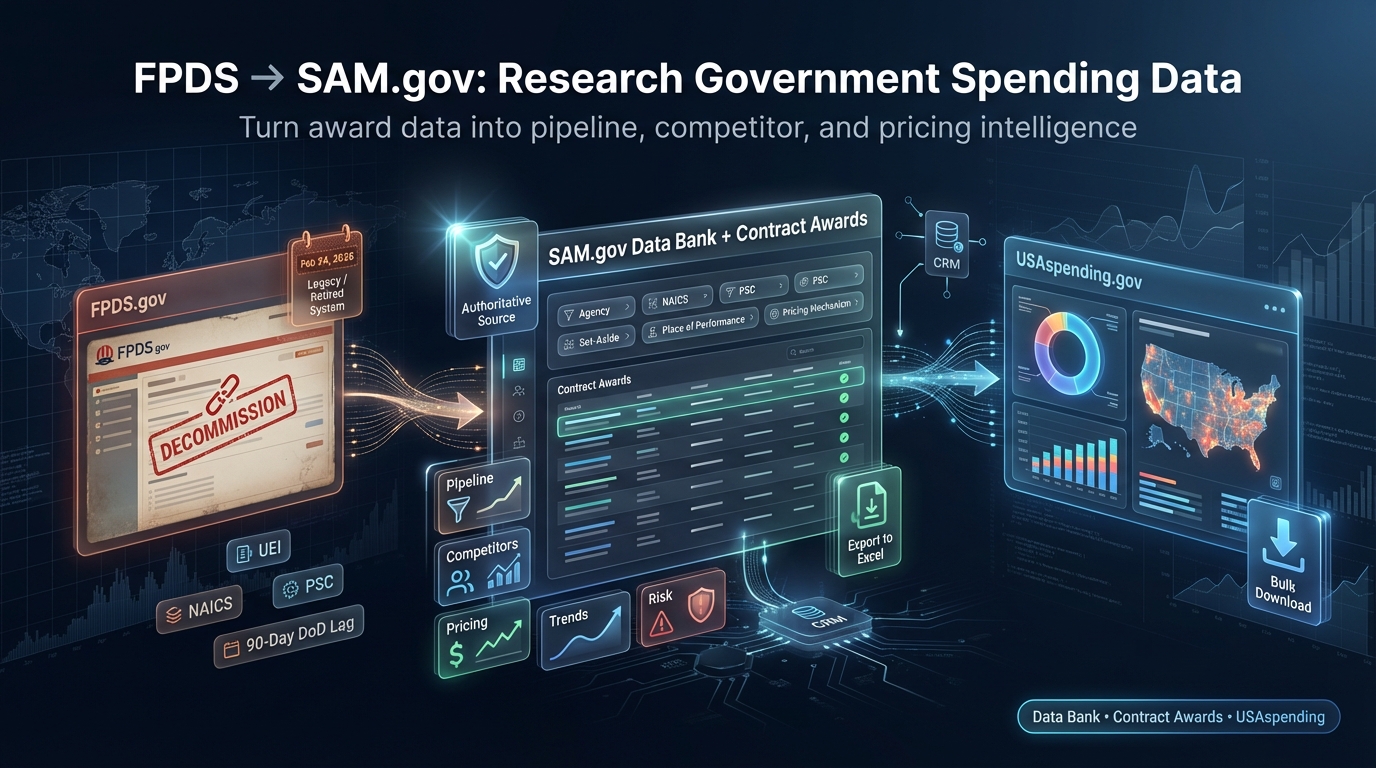
FPDS (Federal Procurement Data System) has been the backbone of federal contract award data for decades. But in 2026, the way you access and analyze that data has changed — and if your market research workflow still starts at FPDS.gov, it's time to modernize.
The General Services Administration (GSA) has migrated FPDS reporting to SAM.gov, and is decommissioning FPDS's public-facing main page and ezSearch — making SAM.gov the authoritative portal for federal contract award data.
This guide explains exactly how to research government spending data using SAM.gov's Data Bank, the Contract Awards search, and USAspending.gov — and how to combine them for pipeline building, competitor analysis, and pricing strategy.
We'll also show how these tools support your broader capture efforts and how to win government contracts more predictably by turning raw award data into actionable intelligence.
What changed: From FPDS to SAM.gov (and what it means for researchers)
GSA integrated FPDS's reporting functions into SAM.gov's Data Bank in October 2020. In July 2025, GSA soft-launched the migration of FPDS's award search (ezSearch) into SAM.gov to modernize filters and usability.
On February 24, 2026, FPDS's public-facing main page and login are being decommissioned; users are redirected to SAM.gov/contracting.
Practically speaking: Researchers should initiate contract award searches and downloads in SAM.gov rather than FPDS.gov. The underlying FPDS data model hasn't changed — but the access layer has.
For macro-level spending across contracts, grants, loans, and more, USAspending.gov remains the government's official open-data source, with interactive explorers, advanced search, and bulk downloads for agency, geography, and object class views.
Use SAM.gov when you need granular award records and standardized contract reports; use USAspending to understand government-wide obligations and spot cross-domain trends.
Where each tool shines: SAM.gov vs. USAspending
SAM.gov Data Bank
- •Standardized "Contract Data" reports (Top 100 Contractors, Small Business Goaling, Federal Procurement Reports)
- •Filter by agency, NAICS, PSC, place of performance, set-aside, competition, pricing mechanisms
- •Export clean datasets to Excel
- •Optimized for market sizing, buyer identification, and goaling analysis
USAspending.gov
- •Advanced Search and Spending Explorer for macro analysis
- •View obligations across agencies and object classes
- •Validate trends by geography
- •Download custom award data in bulk for deeper analysis
- •Covers contracts and grants — aligns contract trends with agency budgets
Step-by-step: Using SAM.gov's Data Bank for FPDS-style research
1) Navigate to the Contract Data reports
In SAM.gov, go to Data Bank → Contract Data. Start with a Standard report for repeatable buyer and vendor views, or explore Static reports (PDF/Excel) for annual summaries like the Top 100 Contractors and Small Business Goaling reports. These are pre-modeled datasets that eliminate manual joins and reduce cleaning time.
2) Apply filters that match your target market
- ✓NAICS codes: Narrow to your core industry; use size standard thresholds to check small-business eligibility.
- ✓PSC codes: Complement NAICS with product/service specificity for sharper demand signals.
- ✓Place of performance: Filter by state, county, or congressional district to align BD resources and partnering strategy.
- ✓Set-aside/competition: Segment opportunities by small business programs (8(a), HUBZone, WOSB, SDVOSB) and competition type.
- ✓Pricing mechanisms: Examine fixed-price vs. cost-type award patterns to inform pricing risk and capture strategy.
Run the report and export to Excel to build pivot tables by funding agency, sub-agency, and fiscal year. Save the report configuration to refresh monthly for trend monitoring.
3) Use signature reports for fast insight
Top 100 Contractors Report
Identify dominant primes and their concentration by agency and portfolio; flag teaming and subcontracting targets.
Small Business Goaling Report
See where agencies exceeded or missed goals — valuable intel for set-aside targeting and compliance planning.
These reports are available directly in the Data Bank and are updated with UEI-based identifiers for consistency post-DUNS transition.
4) Switch to Contract Awards search for transaction-level detail
From the SAM.gov "Contracting" domain, select Contract Awards and use modern filters (keyword, agency, legal business name, UEI, PIID, IDV references). This replaces legacy ezSearch workflows with improved pickers and intuitive partial searches.
Export results to stitch into your CRM, connect to your pricing library, or feed competitive intelligence notebooks.
Programmatic access: The Contract Awards API
Building dashboards or pipelines? GSA's Contract Awards API enables structured queries against award and IDV data, supports logical operators, and returns JSON for up to 400,000 records per call.
It distinguishes between revealed data and unrevealed DoD data (reflecting the standard 90-day lag), helping you automate refreshes while accounting for timing. Use UEI fields for entity joins across systems.
Reminder: The Department of Defense has a standard 90-day public display delay for award data, which means early-year totals understate final obligations — plan your analysis windows accordingly.
USAspending: Macro-level insights, explorers, and bulk downloads
Use Advanced Search to filter awards across fiscal years and categories. The Spending Explorer visualizes obligations by Budget Function, Agency, and Object Class — ideal for validating where your NAICS/PSC demand sits inside broader federal priorities.
For data engineering, Custom Award Data downloads let you pull contract records at scale for time-series models and geographic analyses.
Example workflow: Cross-validating a services market
Say you're a cybersecurity services firm (NAICS 541512/541519, PSC D3 — IT & Telecom). Here's how to cross-validate your market:
- 1In SAM.gov's Data Bank, run a Standard report filtered by those NAICS/PSC and a target region (e.g., VA, MD, DC). Export buyer and vendor summaries.
- 2In USAspending's Advanced Search, filter contracts for the same NAICS/PSC and view Object Class trends to confirm services outpace products at target agencies.
- 3Use the Spending Explorer to see how those agencies' budgets align with your capture timeline.
- 4Cross-reference findings: if SAM.gov shows rising award counts and USAspending confirms budget growth, you've validated demand.
Key trends researchers should account for
$755B in contract obligations (FY2024)
Services continue to outpace products. That's consistent with multi-year services growth and should inform staffing plans, indirect rate assumptions, and teaming strategies.
Record small-business participation
SBA's FY2024 scorecard indicates small firms received roughly $183.5 billion — about 28.8% of eligible prime dollars. Expect more set-aside activity and agency-level focus on meeting or exceeding goals.
DoD reporting lag: Remember the 90-day delay before public display of DoD award data. Timing affects in-year totals; researchers should adjust dashboards and quarter-close analyses to avoid undercounting active obligations.
OTAs are separate
Other Transaction Agreements are not FAR-based contracts and are tracked outside standard contract obligation reporting. If you operate in defense prototyping ecosystems, don't expect OTA dollars to appear in contract obligation figures — treat them as a distinct stream.
UEI replaces DUNS: Better joins, cleaner profiles
Since April 4, 2022, the Unique Entity ID (UEI) has replaced the DUNS number across IAE systems (including SAM.gov, FPDS, eSRS, FSRS, CPARS, and FAPIIS). Align your saved searches, report filters, and data models to the UEI to ensure clean joins across datasets.
Actionable research playbook
Identify top buyers and vehicles
In SAM.gov's Data Bank, run agency-level reports for your NAICS/PSC to find which sub-agencies obligate the most — and through which IDVs (GWACs, Schedules, BPAs). Flag the contracting offices that appear repeatedly.
Build a competitor map
Use the Top 100 Contractors and vendor-level report tabs to isolate incumbents in your category. Capture their award patterns, set-aside participation, mix of fixed-price vs. cost-type awards, and teaming signals.
Validate demand and geography
Cross-reference with USAspending's Explorer and Advanced Search to confirm where demand is rising geographically and by object class. Adjust field marketing and local partnerships accordingly.
Account for DoD lag
When building in-year dashboards, add a "DoD +90" note. Re-run totals one quarter later to true-up obligations before executive reviews.
Normalize on UEI
Replace DUNS in your internal data with UEI across vendor profiles, pipeline records, and pricing libraries to prevent duplicate entities or broken joins.
Automate with the Contract Awards API
Use the API for weekly refreshes of award and IDV data. Store raw JSON, then transform to your dimensional model (agency, NAICS, PSC, set-aside, pricing, place of performance). Build rolling 12-month views and variance alerts.
Separate OTAs from FAR contracts
If you track innovation pipelines (consortium OTAs, prototype awards), treat them as a separate dataset with distinct governance and oversight assumptions. Don't blend OTA dollars into FAR contract obligation analytics.
Model price risk
Segment awards by pricing mechanism and competition. Fixed-price trends suggest room for rate compression and efficiency; cost-type growth signals that agencies value risk-sharing and complexity.
Link to opportunities
From Contract Awards, pivot into Contract Opportunities (SAM.gov) to anticipate recompetes and related notices. Build "award-to-opportunity" watchlists for key contracting offices.
Turn insights into capture actions
Use your findings to prioritize vehicles, shape teaming outreach, and build compelling past performance narratives — the tightest path for how to win government contracts in crowded markets.
Practical examples you can run today
Demand heatmap
Data Bank Standard report filtered by NAICS + PSC + State to find three fastest-growing buyers; export, then create a pivot to rank sub-agencies by YoY obligation growth.
Recompete radar
In Contract Awards, search by PIID patterns tied to a target IDV. Cross-check opportunity postings and anticipated follow-ons to time your capture gates.
Set-aside targeting
Run the Small Business Goaling report for agencies that missed targets; a well-positioned SDVOSB/HUBZone vendor can fill gaps and win on mission + compliance.
Pricing sanity check
Filter awards by pricing mechanism and competition; compare against your indirect rate and fee models before committing to margin assumptions.
Common pitfalls (and how to avoid them)
Relying on outdated FPDS workflows
Fix: Shift searches and reporting into SAM.gov and standardize on UEI.
Misreading in-year totals
Fix: Adjust for DoD's 90-day delay and refresh quarterly.
Mixing award types
Fix: Don't blend OTAs with FAR contracts; track them separately to protect data quality.
Ignoring macro validation
Fix: Use USAspending explorers to confirm agency/object class trends before reallocating BD resources.
How this research helps you win
When used together, SAM.gov's Data Bank, Contract Awards search, USAspending, and the Contract Awards API give you a full-stack view — from who is buying, to how they buy, to where obligations are flowing. That translates into tighter account plans, smarter teaming decisions, and more precise pricing strategies — the core of how to win government contracts consistently.
Build a cadence: run buyer and vendor reports monthly; refresh API-fed dashboards weekly; re-baseline USAspending views quarterly. Then translate insights into capture moves — vehicle prioritization, incumbent displacement plays, and differentiated win themes grounded in data.
Your research cadence:
- 1Monthly: Run buyer and vendor reports in SAM.gov Data Bank
- 2Weekly: Refresh API-fed dashboards with Contract Awards API
- 3Quarterly: Re-baseline USAspending views and true-up DoD totals
With FPDS functionality consolidated into SAM.gov and USAspending providing the big-picture context, there's never been a better time to make data the center of your BD machine.